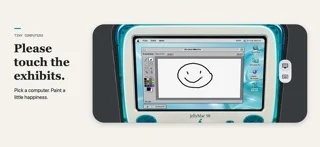
The attraction is the little desktop
Tiny Computers takes a different approach to Duo play. Instead of presenting one conventional game, it recreates small retro-computer experiences. The developer shows miniature displays and working-looking keyboard layouts, turning the half-open phone into an object you can explore.
This is closer to a playful software collection than a promise of running every program from a classic machine. Choose it for the little desktops, built-in interactions and discovery. Do not assume that a familiar-looking computer shell means compatibility with original software.
Watch the developer’s second look
The embedded video is “Tiny Computers - for the iPhone Duo. Second look.” from Fountain Interactive. It is the developer’s own demonstration. We label it that way so it is not confused with an independent review or our own device testing.
A demonstration is particularly useful for this kind of app: typing, switching views and opening a built-in activity are things a static icon cannot explain. Use the video to understand the interaction idea, then use the current App Store listing for version and purchase information.
Tiny Computers - for the iPhone Duo. Second look. · Watch on YouTube ↗
What to check in the store
Look at the current system requirements, update notes and recent user feedback. Small, newly released apps can change quickly, so a launch article or an older screenshot is not the final word on the current build.
Also check which activities are included. A collection of small games and creative tools is a different purchase from a deep single-game campaign or a general-purpose emulator. The name and visual reference alone should not decide that question.
Who the idea is likely to appeal to
This is worth investigating if you enjoy opening drawers, finding hidden interactions and treating software as a little object. A miniature keyboard-and-screen setup gives the fold a recognizable role even before you start playing an activity.
If your priority is a game with clear levels and progression, compare a dedicated puzzle or arcade title instead. The useful distinction is the kind of session you want: exploration of a tiny desktop, or repeated rounds of one game.
A source-based spotlight
We have not measured keyboard responsiveness, frame rate, battery use or save behavior on a physical Duo. The video is linked to its original channel and images, where available, come from the developer’s store listing.
That leaves you with a simple next step: inspect the latest store details, watch enough of the demonstration to understand the premise, and decide whether exploring a miniature computer is how you want to spend your next short session.
Sources & disclosure
This article uses developer descriptions and store artwork. It is not our hands-on review. Embedded trailers and demos are credited to their creators; prices and features can change.